
Home
GPS
Download
Business
Partners
Contact
Family
AVL
Links
History
AsOnTV
Forum
GPSSppc button menus - simpler user interface needed ?
Updated 1800 Tuesday 10th July 2007 UK time
Home
GPS
Download
Business
Partners
Contact
Family
AVL
Links
History
AsOnTV
Forum
GPSSppc button menus - simpler user interface needed ?
Updated 1800 Tuesday 10th July 2007 UK time

 This page is for those helping us improve GPSSppc, introduced on the
Pocket PC
page.
Those who have helped with beta testing are
here
and the latest version of GPSSppc is on the
beta test page.
Please visit the
Forum
for detailed discussion on this subject of
a "new GPSSppc user interface".
This page is for those helping us improve GPSSppc, introduced on the
Pocket PC
page.
Those who have helped with beta testing are
here
and the latest version of GPSSppc is on the
beta test page.
Please visit the
Forum
for detailed discussion on this subject of
a "new GPSSppc user interface".
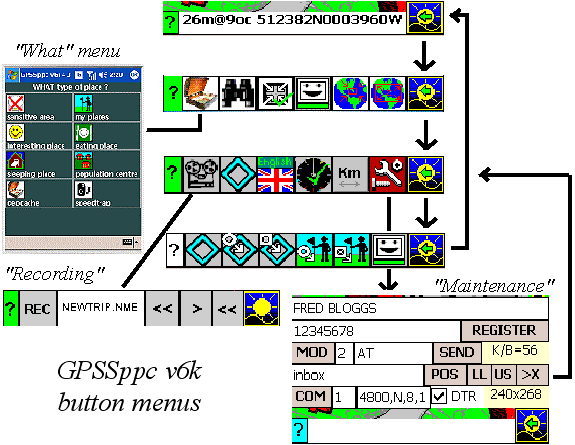
On the right you see an illustration of the menu system that has evolved since GPSSppc was started last year. We are trying to make it even simpler to use.
 Our goal is for someone who has never used ANY GPS system
to pick it up and start doing something useful with it immediately.
e.g. they have just been given a Mio with their rental car, picked up
at the airport, and want to be guided to the hotel. The process
of him or her discovering the more complicated features needs to
be as simple as possible. This will probably be done by "playing with"
the product when they have some time free.
Our goal is for someone who has never used ANY GPS system
to pick it up and start doing something useful with it immediately.
e.g. they have just been given a Mio with their rental car, picked up
at the airport, and want to be guided to the hotel. The process
of him or her discovering the more complicated features needs to
be as simple as possible. This will probably be done by "playing with"
the product when they have some time free.
You may want to visit the brief use manual page, for things like the names given to buttons. e.g. "MENU", "WHAT", "FIND" etc.
We already have a flexible "help" system, under the [?] button, that can be configured by the solution provider, to show pictures, play sounds and explain how to use each of the buttons.
Some buttons are self-evident, like the [?] button for help, or the "maintenance" button, that is clearly for doing technical things. But some buttons could be improved. The less text we have the better: text has to be translated into other languages by someone, including Japanese, Chinese and Russian ! :-)
I look forward to hearing your ideas, direct by email, or on the Forum.
footnote from Robin on 10th July:
 here is an idea
for a new "map control" page of buttons. These will include the old [Zoom in] and [zoom out]
buttons, but will also enable the user to select what controls the moving map.
From left to right, after the [help] button, we have:
here is an idea
for a new "map control" page of buttons. These will include the old [Zoom in] and [zoom out]
buttons, but will also enable the user to select what controls the moving map.
From left to right, after the [help] button, we have: